
If the school wants to add Non-Teaching Staff (Trustee, School owner, School admin, Report school executive, Report school head) follow the below process
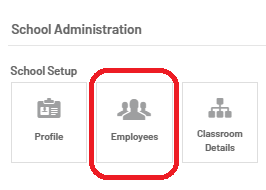
Step 1 - Click on Employees under School Administration
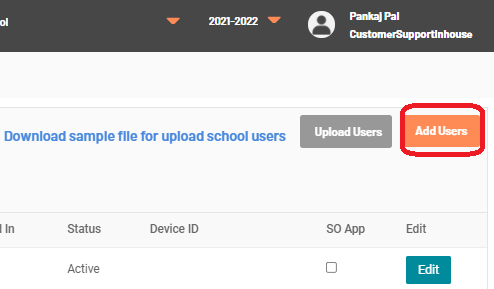
Step 2 - Click on Add Users(On the Right top corner)
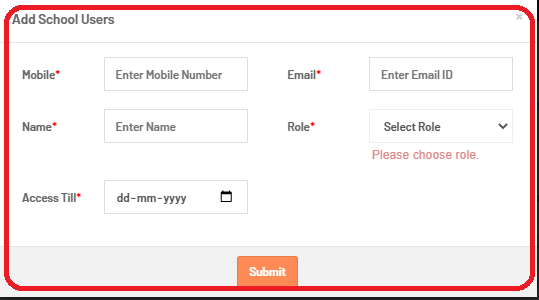
Step 3 - Enter all the details of the user and select the role as per the request. The user will get the requested type of access
If the school wants to add Teaching Staff (Teacher, AC & Principal )follow the below process.
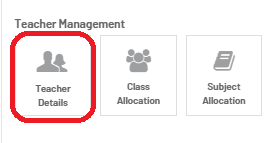
Step 1 - Click on Teacher details under Teacher Management
Step 2 - Click on the Plus sign on the Right-hand side to add the Teacher, Principal or AC

Step 3 - Fill all the details in the Teacher information of the Teacher, Principal or AC and select on Save.

***Add information like Name & Last name. Mobile number, select the Role as per the request, select the English level & select TDW certification (Currently it would be No)
Imp Note -
- The Teacher will be able to log in with the number, saved against the teacher
- Depending on the English skill level, the teacher would be assigned Elga level
How to update the Phone number, Name, Role of existing Employees of the School
If the school wants to update the Name & Role of the existing Trustee, School owner, School admin, Report school executive, Report school head follow the below process -->Click on Employees -->Find the employee and click on edit --> Now you can edit the details as per the requirement.
If the school wants to update the Name & Role of the Teacher, Principal & AC follow the below process -->Click on Teacher details -->Find the Teacher/AC or the Principal and click on edit --> Now you can edit the details as per the requirement.
***Phone number's of Employees/School Staff once added in Nucleus can never be edited. If we want to update the phone number for them then we have to make them inactive and add them to the Nucleus again with the new number against them